Gerald Gmainer11 min read
A receipt scanner in Flutter: ML Kit, RKSV QR codes, no LLM
How MoneyKoi's receipt scanner in Flutter reads Austrian RKSV QR codes, extracts line items with ML Kit and per-shop parsers, and checks the total on the phone.
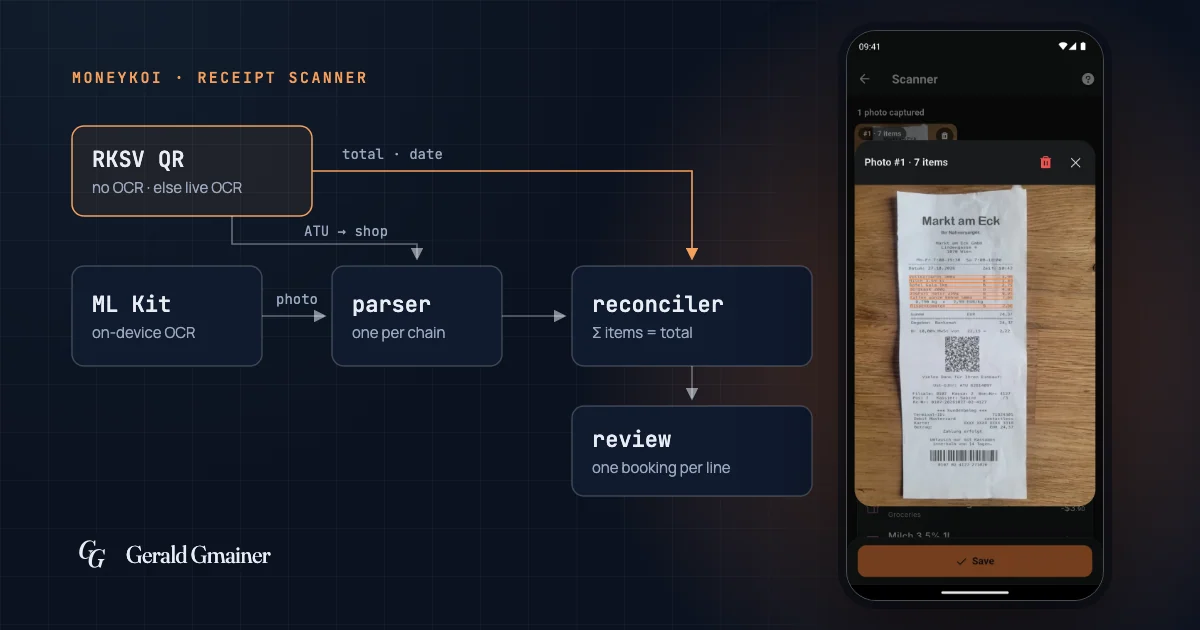
MoneyKoi's receipt scanner in Flutter reads Austrian receipts right on the phone. The QR code that Austrian law requires on every till receipt (RKSV) gives the total and date without any OCR. ML Kit recognises the text, a parser for each shop chain reads the line items, and a reconciler checks that they add up to the total. All of it is rule-based, with no LLM, and the photo is never sent to an AI service.
Why the receipt scanner runs on the device, without an LLM
MoneyKoi is a budget book with no bank login and no cloud AI (see the project). So the scanner has to run on the device and work in airplane mode.
For a while the app had an experimental, opt-in AI scanner with a language model that also ran on the device (Gemma via LiteRT-LM). I removed it again at the end of September 2026. What remains is the rule-based path. Its advantage: every error can be traced to a rule, and a fix gets a unit test named after the receipt that exposed the problem.
The flow has three steps:
- Find the total. The camera runs while OCR looks for shop, total and date. A field locks once it is recognised with enough confidence and the same in two frames. If the app finds an RKSV code, this step is done at once, with no OCR at all.
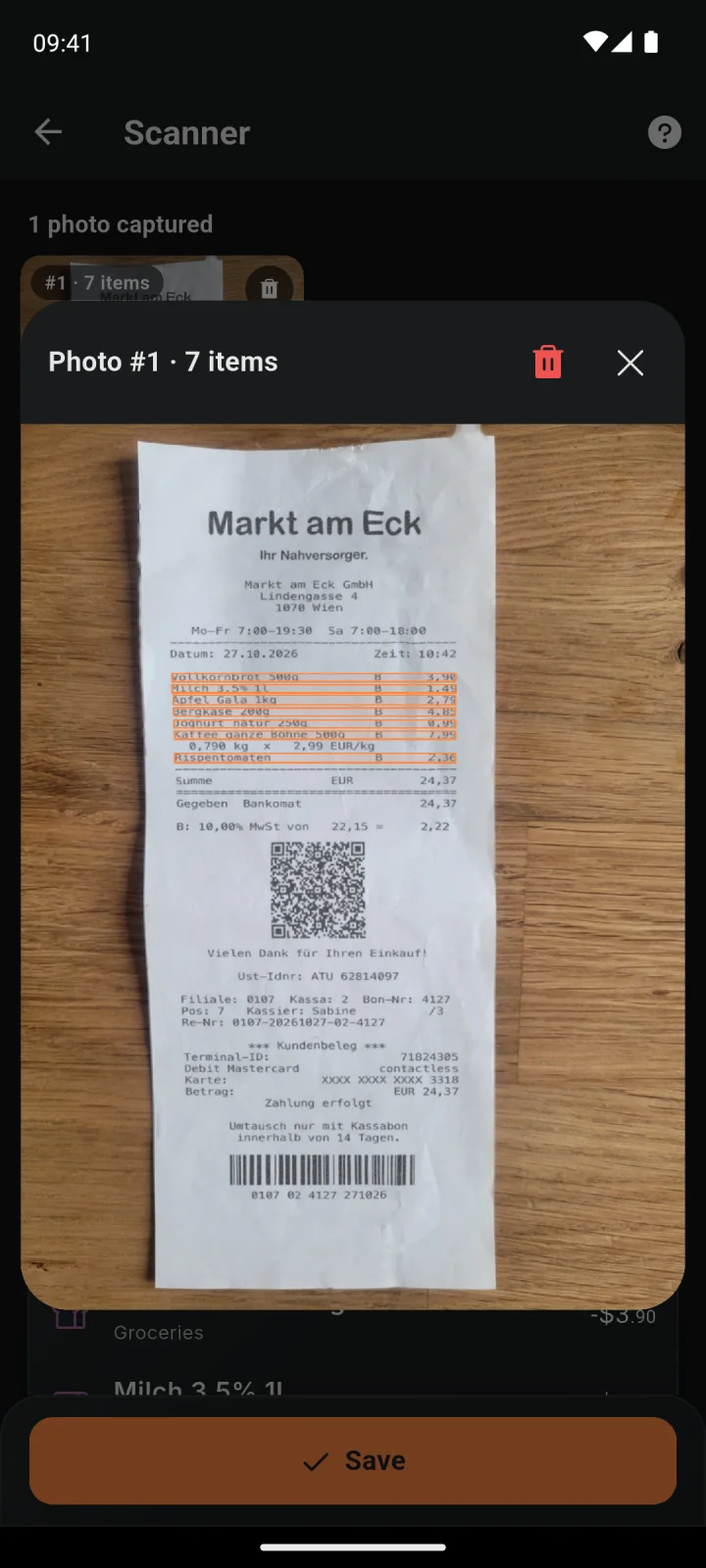
- Capture the items. The user photographs the receipt, long ones in several parts. Each photo is read with the parser for that chain, and lines that overlap between two photos are merged.
- Review. Everything is shown for checking before a booking is created. Saving creates one booking per line item.
Reading the RKSV QR code
Since 2017, Austria's cash register security regulation (Registrierkassensicherheitsverordnung, RKSV) has required receipts from registered tills to carry a signed, machine-readable code. In my collection of real receipts it is on practically every one: supermarkets, franchise grocers, discounters. For a scanner that is gold, because it is right even when OCR misreads the printed text. You can't rely on it entirely, though: McDonald's codes carry only zero amounts, so the total there comes from the text.
The content is a string whose parts are separated by underscores (the Austrian Ministry of Finance's sample code and specification):
| Part | Content |
|---|---|
R1-AT0 | format identifier |
| till ID | identifies the cash register |
| receipt number | sequential per till |
| date and time | e.g. 2026-10-27T10:42:13 |
| five amounts | gross amount per VAT rate, e.g. 22,15 |
| turnover counter | encrypted |
| certificate serial number | often includes the company's VAT number |
| previous receipt's signature, signature | to verify the chain |
The receipt total is the sum of the five amounts. There is no shop name in it. Simplified, the parser looks like this:
final _rksvDate = RegExp(r'^\d{4}-\d{2}-\d{2}T\d{2}:\d{2}');
final _atu = RegExp(r'ATU\d{8}');

RksvData? parseRksv(String payload) {
  final parts = payload.split('_'); // leading '_' gives an empty parts[0]
  if (parts.length < 12 || !parts[1].startsWith('R1-AT')) return null;

  // Find the date instead of trusting a fixed index.
  final d = [3, 4, 5, 6].firstWhere(
    (i) => i < parts.length && _rksvDate.hasMatch(parts[i]),
    orElse: () => -1,
  );
  if (d < 2 || d + 7 >= parts.length) return null;

  final brackets = parts
      .sublist(d + 1, d + 6)
      .map((s) => double.tryParse(s.replaceAll(',', '.')) ?? 0.0);

  final certSerial = parts[d + 7]; // d + 6 is the encrypted turnover counter
  return RksvData(
    date: DateTime.parse(parts[d]),
    total: brackets.fold(0.0, (a, b) => a + b),
    cashRegisterId: parts[d - 2],
    atu: _atu.firstMatch(certSerial)?.group(0),
  );
}
Searching for the date instead of using a fixed index is the lesson from two bugs. The first version read the date from parts[3] – which is the receipt number – and summed the amounts shifted by one. The total was still right, by coincidence, because the misparsed date counted as 0. The second version read the certificate serial from the position of the encrypted turnover counter.
Who issued the receipt
The certificate serial often contains the company's Austrian VAT number (ATU plus eight digits). When it doesn't, the scanner reads the VAT number printed on the receipt. The number covers a whole chain, so it makes a good key. MoneyKoi resolves it in this order:
- a built-in table of VAT numbers for large chains,
- mappings learned on the device: certificate, VAT number, till ID,
- a lookup at the EU's VIES service, whose answer is learned for the next scan,
- the shop name from OCR.
The first version of the table had been filled in from memory. VIES rejected its numbers for SPAR, HOFER, LIDL, dm, BIPA and OMV; none of them could ever appear on a real receipt. Today a number only goes into the table if it comes from a real receipt, an imprint page or the company register, and VIES confirms it. The VIES lookup itself had a similar bug: it sent the eight digits without the leading U, and VIES answered "invalid" every time. So the third step never worked at first.
Franchise shops such as ADEG carry the VAT number of the individual operator, not of the chain. There, only per-shop learning helps.
OCR with ML Kit: from text lines to receipt rows
ML Kit returns text lines with bounding boxes, not a table. So the first step is geometry: lines that overlap vertically by at least 55 % are merged into one receipt row. A price only counts if it sits in the right part of the recognised text – measured against the width of the text, not the photo, so a receipt that doesn't fill the frame still works. If the grouping doesn't add up to the total, the scanner retries at 45 % and 65 % and takes the closest result.
Then everything is normalised, and much of the small work sits here:
- Minus signs. Receipts and OCR produce hyphens, en dashes, minus signs and more. Everything becomes
-before parsing. - Decimal separators. BILLA and ADEG print dots on the thermal paper (
25.21), other chains commas. Both must work. - Split prices.
2,9 9and2 ,99become2,99again, without gluing quantities or years together. - Shifted columns. At LIDL the price column sits about half a line below the names. Without a correction every price slips by one item.
One parser per chain
A registry picks a parser based on the shop. SPAR, BILLA, LIDL, ADEG, TEDi, Smyths and OBI have their own; HOFER currently goes through the SPAR parser because I have no HOFER receipts to test with yet. Every other shop gets a generic parser that works from geometry alone.
The chains differ in details that decide between right and wrong. The biggest topic is discounts. At SPAR, Aktionsersparnis 1,00 ("promotion saving") is only information; the price above already includes it. App-Joker 25% -1,25, on the other hand, is subtracted. Because OCR sometimes loses the minus, unambiguous discount words always subtract the amount whatever its sign, but never below zero. A negative amount with no item before it is dropped and never added as an item of its own.
A second example is the list of noise words used to filter out card payment lines. At first it was checked with contains. But STAN (an authorisation code) is inside LAUGENSTAN (a pretzel stick), BAR inside BARILLA, and % in every discount. Today it uses a word boundary:
final _noise = <String, RegExp>{};

bool isShopNoise(String rowText, Iterable<String> keywords) {
  final upper = rowText.toUpperCase();
  return keywords.any((k) => _noise
      .putIfAbsent(k, () => RegExp('\\b${RegExp.escape(k)}\\b'))
      .hasMatch(upper));
}

// isShopNoise('STAN ZAHLUNG', ['STAN']) -> true
// isShopNoise('LAUGENSTAN', ['STAN'])   -> false
The reconciler: the total has to match
After every photo, a reconciler compares the sum of the items with the locked total. If they differ, it looks for the one correction of a single price that hits the total exactly: a typical OCR digit mix-up or a misplaced decimal point (199 → 1,99). If there is exactly one such correction, it is applied and the item is highlighted. If there are several or none, nothing changes, and the review screen shows the difference.
There is deliberately no made-up "missing items" line to fill the gap. Users preferred a visible error to a line that hides the problem.
The check gets sharper with the tax table printed at the bottom of the receipt. It gives the VAT rate for each amount, and at most chains each item carries a letter for its rate. That allows each VAT group to be checked on its own: two errors in two groups both heal, and two errors that cancel out in the overall total still show up. The scanner only uses the order of the five amounts in the QR code once it has matched a printed table at least three times on the device, with no contradiction.
Categories without AI
Every item needs a category, and "Other" as an automatic way out is ruled out. The chain of attempts, slightly simplified:
- Whatever was picked during the scan.
- Corrections learned on the device.
- A keyword table.
- The user's own 300 most recent bookings.
- Fuzzy matching with a weighted Levenshtein distance, where typical OCR mix-ups (
0forO) cost less than other errors. - A grocery dictionary.
- The VAT rate: 10 % at the supermarkets means groceries. 20 % stays open on purpose, because alcohol and household goods share that rate.
Measured against real receipts
Without measurement every rule is a hunch. So there is a private collection of real receipt photos, each with a file recording the correct result. A test run scores every receipt and compares per chain. A ratchet makes sure no change breaks a receipt that passed before.
For fast iteration the scoring runs on the Mac with Apple Vision instead of ML Kit. That a stand-in is not the real thing I learnt the hard way: four rounds of rules for the receipt header were tuned to Vision's row shapes, and with ML Kit exactly that part failed more often. Since then there is a second measurement with the real ML Kit in the Android emulator, with its own baseline. A change has to pass both.
Privacy
Text recognition and barcode scanning run on the device; the photo and its text are never sent to an AI service. Two exceptions deserve a mention: if the app doesn't know a shop's VAT number, it asks VIES – only the company's number is sent. And with the Cloud plan, the photo is stored with the book as a receipt, in the EU.
Limits
- Latin script only. The text recognition in use cannot read Japanese receipts, even though the app speaks Japanese.
- Two-decimal currencies only. For a book in yen or forint the scanner is disabled.
- German tills from the spec. The scanner reads the QR code of German tills (TSE), built from the specification. It has not been tested on a real German receipt yet.
- Gaps in coverage. I have no test receipts for HOFER or PENNY; HOFER runs through the SPAR parser, and that is an assumption.
- Poor paper. Faded thermal receipts and digits the text recognition loses are the most common reasons an item is missing or wrong.
Takeaways
- When a receipt carries a signed code, that code is the truth. OCR only fills in what the code doesn't contain.
- Find fields in a code by pattern, not by fixed index.
- Apply a correction only when it is unambiguous. Otherwise show the difference.
- Never type reference data such as VAT numbers from memory; check them at the source.
- A measuring tool is only as good as its closeness to the real environment. A proxy needs a second measurement with the original.
MoneyKoi is available as an Android app on Google Play. More information at moneykoi.com.
Flutter · ML Kit · OCR